Even I no longer knew how my terminals worked
How terminals came about in Sketrix: first too much automation, then too little, and in the end a system where you can see what you are doing.
What it does → Schematic editorFrom my working life I know one thing about terminals that makes building a strip enormously easy: if I have a strip -XD1 with its first terminal and I place a second one next to it, the new one immediately takes the name of the strip beside it, and I do not have to type anything. The big program I did this in for years got this one thing right, and I absolutely wanted to have it.
So my plan from the start was to build terminals as simply as I possibly could, with as few clicks as possible, and ideally in a way where everything sets itself.
First too much, then too little
In February the first terminals were in place together with the terminal plan, and through to the summer bridges, colours and the export came along. All the while I kept going one step further towards automation, and at some point that automation started going round in circles. Some terminals were fixed, others got pulled together when you moved them, numbers rearranged themselves whenever you placed or deleted something, and there was no longer a clear line that all of this followed. Anyone who leaves a strip for a day has to know where they were when they come back, and the bad part was that even I, the one who had built it, could no longer say when a terminal was fixed and when it was not.
At the start of September there were four rounds of repairs in a row, and every one of them dug up new cases of the same kind. There was no single bug left to find, because the thing as a whole was built wrong, too complicated and impossible to see through for the person using it. So I looked at how it is done in the trade, and in one big rebuild I settled how terminals should think across thirty-three decisions. The most important one: the app never again touches existing numbers on its own. Around 3,100 lines went out in the process, and with them eight test files, seven of which were only a day or two old.
The pendulum then swung the other way, though. If I now renamed the first terminal of a strip, everything behind it simply stayed where it was, and I would have had to lasso every strip and rename it by hand. That was the moment I said stop, this does not work at all. Two weeks after the rebuild my notes contain the sentence that I probably built it too complicated after all, and some of the decisions were reversed again. One rule that was supposed to remember the last identifier used lived for exactly sixteen days. This back and forth was never the plan, at some point it was simply building blind.
White is typed, grey is taken over
Today it runs on a few rules. When I place a terminal, it looks to its left at its neighbour in the same row and takes over that neighbour’s strip, and that works the same whether I place, drag, nudge with the keyboard or align. If there is no neighbour, a new strip starts, with the lowest identifier that is still free.
On top of that comes the part that actually solved the problem, because now you can see what you are doing. A terminal whose name I typed myself is shown in white, and one that only took it over from its neighbour is grey. If I rename the white one, the grey ones to its right follow along up to the next white one, and the whole thing is a single step to undo. Numbers never change behind your back any more, anyone who wants to renumber presses a button on the strip in the terminal plan, and duplicate numbers turn orange.
The eight terminals to the left
The moment I noticed it holds was while testing with a structure box. To the left stand eight terminals in four strips, and I place a new terminal in the box right next to them. In the past it would have stubbornly taken the neighbour’s name, now Sketrix notices that something of its own starts here and straight away takes the next free identifier, just by clicking.
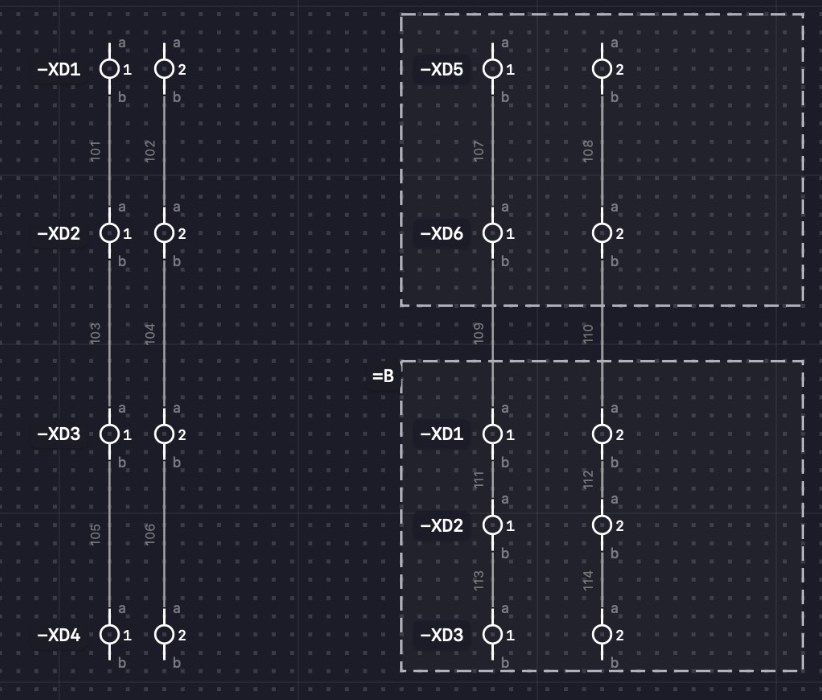
The last stumbling block was editing, because building a page from scratch had been working well for a while. If I had three motor feeders side by side and moved the whole page, the terminals pulled together. Since the rule applies that a terminal only takes over when it really gets a new left neighbour, everything stays where it belongs when you move things. The acceptance run after that came out at thirteen out of thirteen checks.
Today terminals live in around 3,900 lines, backed by 248 tests, and they turn up in 287 entries in my notes.
And now
The rules are in place, and building and editing feel the way I imagined at the beginning. The last thing to arrive was a checkbox that lets you hold a strip in place, so that it is not taken over when you move it behind another one.
Still open is the question of whether contacts on contactors should work the same way, because the same principle is in there, and I do not want two systems side by side that do almost the same thing and only differ in the details. That is what I am looking at next.
Martin